Find my reference material
My manuals, equipment records and practical notes are together in an onboard collection.
 Connected Sailing
13 / Life aboard
A place to keep the useful things I learn about Jocelyn.
See how it helps ↓
How it helps me aboard Jocelyn
My manuals, equipment records and practical notes are together in an onboard collection.
Maintenance records, checklists and reminders sit alongside my sailing preparation.
What I learn stays with the boat, ready when I or somebody else aboard needs it.
Boat Brain brings the boat’s reference information and practical records into one place. On Jocelyn that includes sail plans, the anchoring procedure, checklists, maintenance jobs, fuel and water. I can ask about the structured information stored locally without sending it to an external AI service. The boat’s setup and instructions need reviewing for each vessel; Jocelyn’s settings are examples of what a boat-specific memory can contain.
Fuel & Water puts estimated fuel, engine hours, service progress, water-tank contents and drinking-water bottles together. Recorded engine-running periods feed the fuel estimate; refuelling and corrections keep the baseline useful. Tank levels and bottle counts come from what I record, rather than an automatic tank sensor. I can log supplies used or added and retain a service history. The examples below show why this is useful before a passage: how much is aboard, what needs replenishing, and what work is approaching.
A next-visit list reminds me what to bring aboard, while a separate work list keeps maintenance tasks visible until completed. Jobs can carry photographs and notes. Editable checklists cover arriving aboard, preparing to sail, raising sail, anchoring, the safety brief, and finishing and leaving. These are working owner routines: the skipper confirms the checks and the relevant equipment instructions remain authoritative.
The Documents library imports PDF manuals for offline reading and searches readable text, titles and notes. For example, I can keep an engine reference, an equipment inventory and a pre-season checklist close to the associated jobs. Imported PDFs are reference documents; they do not automatically become confirmed advice, and scanned pages may not have searchable text. Structured Boat Brain records use private iCloud synchronisation. The PDF library is stored separately on each device. The Connected Sailing Manual is also searchable, and boat-specific sail and anchoring guides sit alongside these records.
My setup on screen
Documents, jobs, supplies, engine maintenance, checklists and sail references give the boat’s memory a practical role. These are current Boat Brain interfaces with example entries or Jocelyn-specific reference settings.
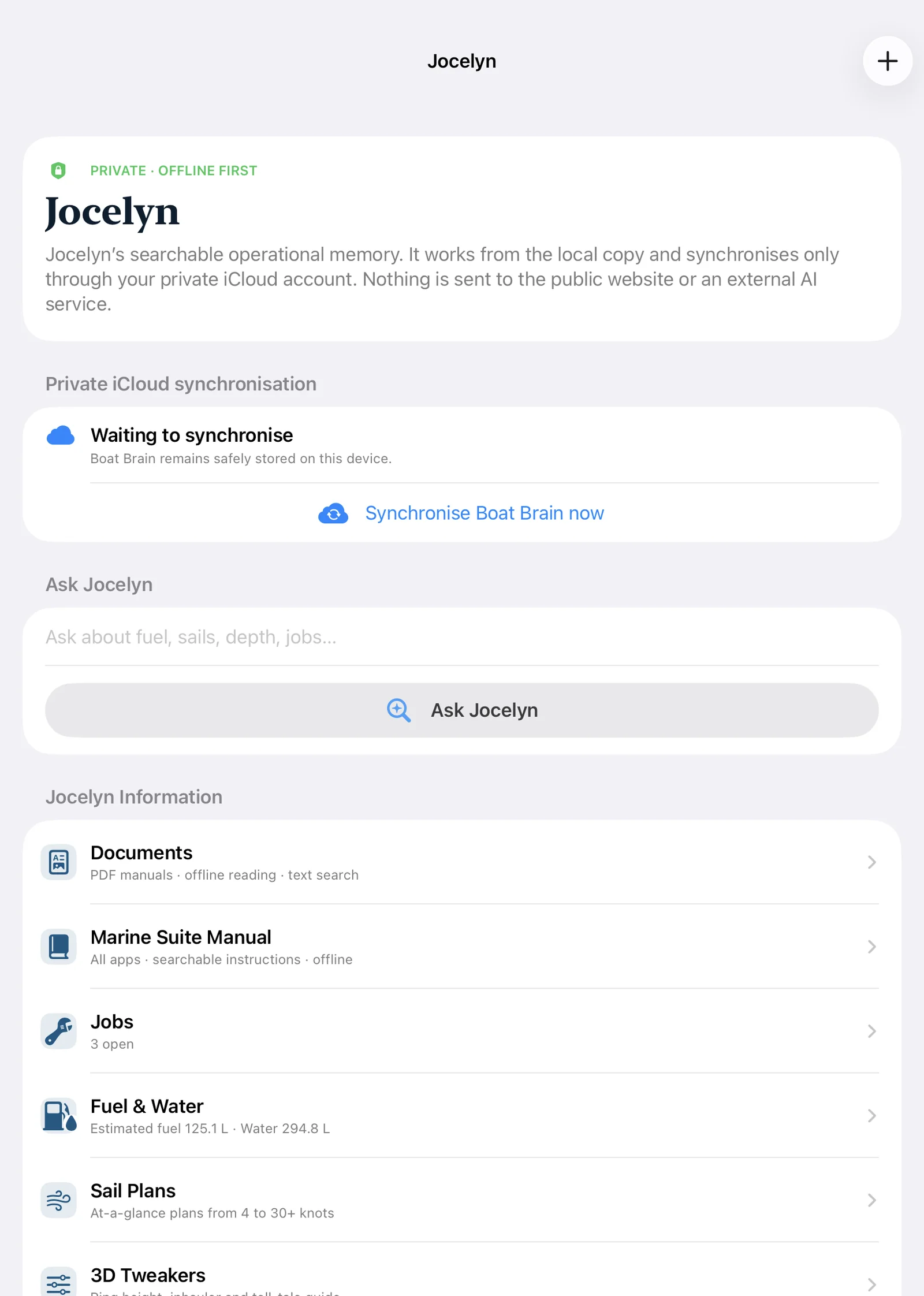
Boat Brain keeps questions, documents, jobs, fuel and water, and boat-specific guides together. This is Jocelyn’s current interface. Structured records work locally and can synchronise privately through iCloud.
Enlarge screenshot ↗
Import PDF manuals, keep them available offline and search their readable text. These three documents were created for the demonstration. The local PDF library is separate from structured Boat Brain cloud synchronisation.
Enlarge screenshot ↗
A next-visit list and a separate work list turn a remembered job into something I can bring aboard and finish. The tasks shown here are demonstration entries; jobs can also carry notes and photographs.
Enlarge screenshot ↗
Estimated fuel, water aboard, drinking supplies and engine time sit together. The example uses recorded inputs and estimates; it does not claim automatic tank-level measurement.
Enlarge screenshot ↗
I record bottles added or used and correct a count after checking what is actually aboard. This demonstration shows the separate drinking-water record alongside the tank estimate.
Enlarge screenshot ↗
Engine hours, the next service milestone and the model reference sit together. This is Jocelyn’s engine-specific setup with example hours; another boat needs its own equipment and service schedule reviewed.
Enlarge screenshot ↗
The actual Preparing to sail checklist shows engine, equipment, lines, propulsion, fuel and keel checks. Owner routines are editable, and each item is deliberately confirmed by the skipper.
Enlarge screenshot ↗
The sail-plan reference is part of the boat’s operational memory, alongside the jobs and supplies. It reflects Jocelyn’s setup; it is a reviewed reference rather than a universal sail recommendation.
Enlarge screenshot ↗It connects with…